> For the complete documentation index, see [llms.txt](https://docs.airdev.co/canvas/llms.txt). Markdown versions of documentation pages are available by appending `.md` to page URLs; this page is available as [Markdown](https://docs.airdev.co/canvas/5.0/canvas-library/page-templates/basic-bubble-marketing-page.md).
# Basic Bubble Marketing Page
## Overview
This page includes 3 marketing blocks built with Bubble elements. You can add more marketing blocks to the page by opening the Canvas extension > going to Blocks > Filtering on marketing blocks.
## Structure
* **Page** \
You can easily change the page background to one of our free svg backgrounds.
* **Group Main hero blocks**\
This is the first block that users will see when they visit your website. This section should summarize what your website is about in a few sentences and include call to action buttons. This block includes a **Group Collapsible Standard SearchBar** that you can unhide by checking the box for '*This element is visible on page load'*.

* **Group Main 2 column feature blocks**\
This is block allows you to feature a list of items. Each item includes an icon, title, and description.

* **Group Main call to action block**\
This block features a centered description text and two buttons.\

This page also includes a popup and a reusable element:
* **Popup Hidden Variables** contains four groups:
* **var - app settings**\
This group stores the app settings object (e.g., app name, primary color, and etc.)
* **var - marketing page id (do not delete)**\
This allows the Canvas extension to identify the page as a marketing page and to filter the extension blocks to show only marketing blocks
* **var - app variables**\
This group stores the app variables object
* **var - dummy**\
A placeholder group in case you want to use any hidden variable groups later.
* [Header](/canvas/5.0/canvas-functionality/reference/reusable-elements/header.md)
* [Footer](/canvas/5.0/canvas-functionality/reference/reusable-elements/footer.md)
## How to set up
#### Changing your page background
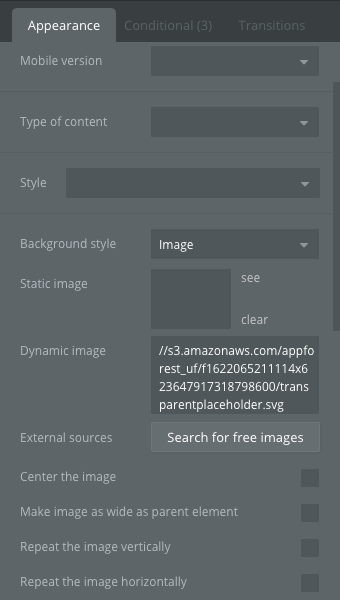
* By default, the page will come with a few placeholder conditional statements. You should save the SVG backgrounds here for later use.
\
 * To use one of these backgrounds, simply toggle to the 'Appearance' tab and copy and paste the image settings from the 'Conditional' tab over.
\
* To use one of these backgrounds, simply toggle to the 'Appearance' tab and copy and paste the image settings from the 'Conditional' tab over.
\
 * To change the colors in the svg background, you would need to have a program that supports this format (e.g., Sketch app or Adobe illustrator).
#### Updates to older versions of the template
* Please check your Canvas Base Template version by going to your Bubble editor > Data tab > App data tab > All websites table > Click to view the website entry and the **Template version** field. If your template version is not 3.3.3 or later then please add the following state and workflows:
* Go to the **header** reusable and add a custom state called '*Remove background?*' (yes/no)

* Select **Group Header** and make the following changes to the conditional tab:\
Add a new conditional *when header's Remove background? is "yes" then change background color opacity to 0 and set boxshadow style to "None"*.\
Modify the conditional statement *when Current page scrolling position > 0* by adding *and header's Remove background? is "no"*.

#### Show or hide a block
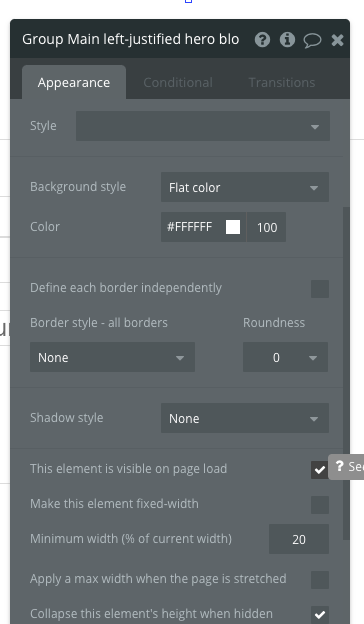
* To show or hide a block, simply click on the main group and check or uncheck the box for '*This element is visible on page load'*.
* To change the colors in the svg background, you would need to have a program that supports this format (e.g., Sketch app or Adobe illustrator).
#### Updates to older versions of the template
* Please check your Canvas Base Template version by going to your Bubble editor > Data tab > App data tab > All websites table > Click to view the website entry and the **Template version** field. If your template version is not 3.3.3 or later then please add the following state and workflows:
* Go to the **header** reusable and add a custom state called '*Remove background?*' (yes/no)

* Select **Group Header** and make the following changes to the conditional tab:\
Add a new conditional *when header's Remove background? is "yes" then change background color opacity to 0 and set boxshadow style to "None"*.\
Modify the conditional statement *when Current page scrolling position > 0* by adding *and header's Remove background? is "no"*.

#### Show or hide a block
* To show or hide a block, simply click on the main group and check or uncheck the box for '*This element is visible on page load'*.
* Update the data source of repeating groups in the features list blocks
* Update the image and text content in the blocks and add workflows to buttons