> For the complete documentation index, see [llms.txt](https://docs.airdev.co/canvas/llms.txt). Markdown versions of documentation pages are available by appending `.md` to page URLs; this page is available as [Markdown](https://docs.airdev.co/canvas/5.2/canvas-library/blocks/pagination.md).
# Pagination
## Overview
Use this to divide large amounts of content into smaller chunks across multiple pages.
## Structure
This pagination block is a reusable element called **pagination\_template** and it uses a number data source. You will need to pass the repeating group you're paginating's data source's count to this pagination block.
In the **pagination\_template** reusable element:
* **Group Main viewing results and show per page dropdown**
This group contains the text for tracking the results the user is viewing (e.g. Viewing 1–50 of 2,500 results). It also includes the show per page dropdown, where the user can toggle between the maximum number of items to display per page. This group will be hidden when the current page's width is less than or equal to 615.
* **Group Inner pagination UI**
* This group contains the pagination UI for navigating to the different pages:
* Clicking on **Group Main previous page\_action** will navigate to the previous page and clicking on **Group Main next page\_action** will navigate to the next page.
* **Group Main first more pages** includes the UI for going to the first page and for navigating to the previous pages. Clicking on **Group Main move interval pages forward\_action (...)** will navigate to the previous 5 pages.
* **Group Main last more pages** includes the UI for going to the last page and for navigating to the next pages. Clicking on **Group Main move interval pages backward\_action** will navigate to the next 5 pages.
* **RepeatingGroup pages (number)** displays the list of pages based on the pagination\_template's two states: page from and page until.
* Its data source uses a toolbox plugin element called **ListofNumbers Number of pages**. This element needs to always be visible on page load.
* **Group Main last more pages** includes the UI for going to the last page and for navigating to the next pages.
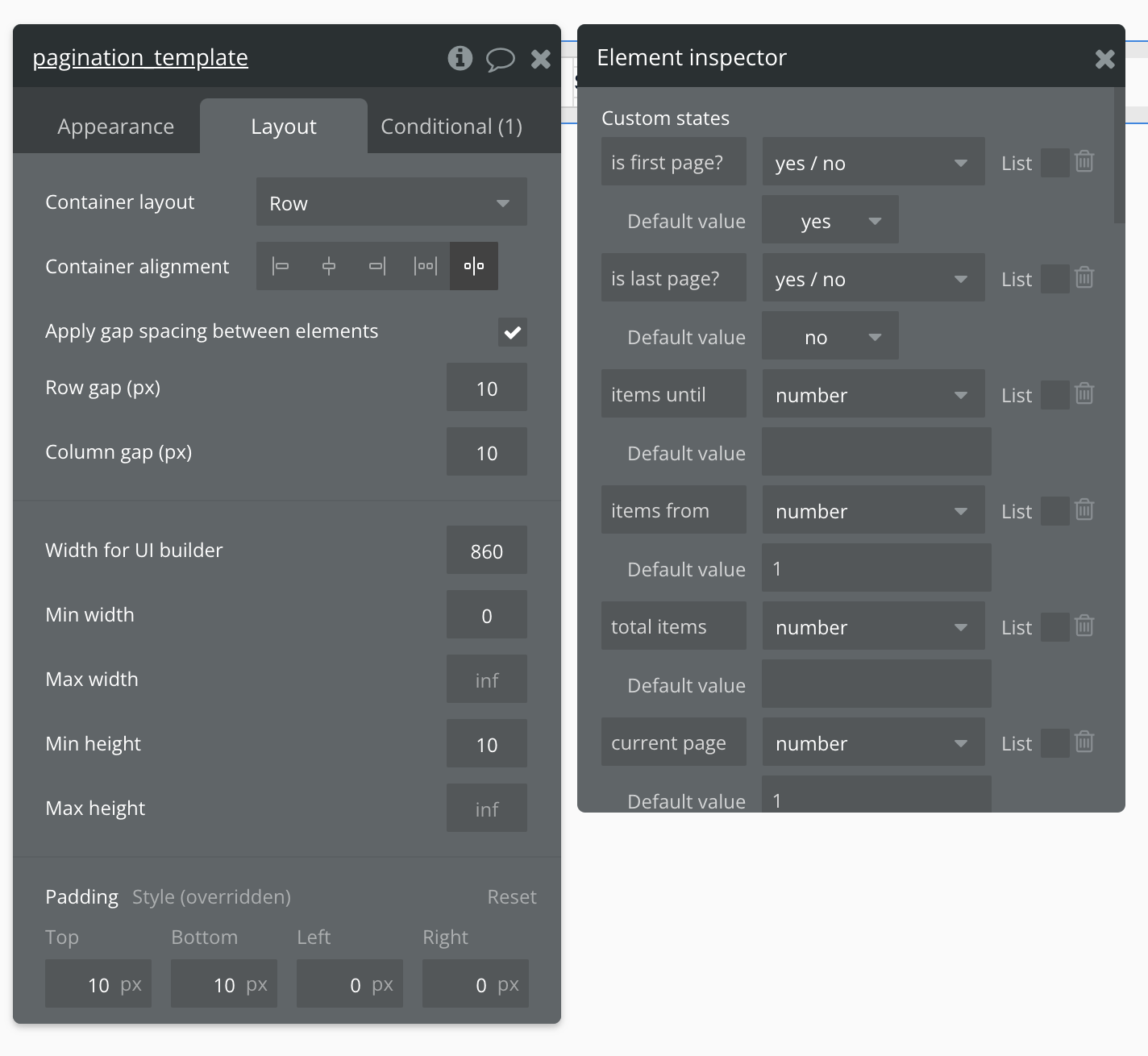
This reusable element includes 10 states (to view, click on the pagination\_template reusable element and the "i" icon):
* **is first page?** (yes/no), default set to yes - If this state is yes then it will make the 'Prev' button (**Group Main previous page\_action**) not clickable
* **is last page?** (yes/no), default set to no - If this state is yes then it will make the 'Next' button (**Group Main next page\_action**) not clickable
* **items until** (number) - is responsible for the end number of the range of results presented in the text element inside **Text Viewing Results**
* **items from** (number), default set to 1 - is responsible for the start number of the range of results presented in the text element inside **Text Viewing Results**
* **total items** (number) - the number of total items returned from the reusable element's data source
* **current page** (number), default set to 1 - the current page number
* **page from** (number), default set to 1 - used to filter **RepeatingGroup pages** to show pages from
* **page until** (number), default set to 5 - used to filter **RepeatingGroup pages** to show pages until
* **total pages** (number) - displays the total number of pages, factoring in the number of items to show per page; used in various workflow calculations
* **show per page** (number), default set to 10 - displays the number of items to show in each page; used in various workflow calculations
Clicking on 'i' reveals the reusable element states
This reusable element will also include a **Hidden variables popup**:
* **var - ⚙️ App settings** - This group stores the `App settings` (e.g., app name, primary color, and etc.).
* **var - total pages** - This group stores the calculations from ListofNumbers Number of pages and is used in workflow calculations.
* **var - Items until** - This group stores the calculations for the reusable's **items until** state.
* **var - current page** - This group stores the calculations for the reusable's **current page** state.
* **var - pagination interval** - This group stores the default number of pages to display in **RepeatingGroup pages (number)**. This variable is used in various workflow calculations. Please note that changing this number will likely require tweaking the logics of other workflows and would make the pagination block not responsive. We recommend leaving the default settings as it is.
* **var - placeholder** - This is a placeholder group for users to add their own variable.
## How to set up
### Add data source to pagination block
{% embed url="" %}
Updating the data source of the repeating group you're paginating and passing the data source's count to the pagination reusable element
{% endembed %}
{% hint style="warning" %}
It's important here that you are passing the **full list** of 'Do a search for \[data type]:count' to the pagination\_template reusable element and not just referencing 'Repeating group \[data type]'s list of \[data]:count'.
{% endhint %}
### Do I need to duplicate pagination\_template for every Repeating Group I use it with?
No, since the pagination reusable element's data source is of type number, you can use the same pagination reusable element for any repeating group, even if the repeating groups' data types are different.