> For the complete documentation index, see [llms.txt](https://docs.airdev.co/canvas/llms.txt). Markdown versions of documentation pages are available by appending `.md` to page URLs; this page is available as [Markdown](https://docs.airdev.co/canvas/6.0/canvas-library/blocks/top-input-chat-widget.md).
# Top Input Chat Widget
Use this when it is most important to load results quickly.
## Overview


This block allows a user to manage multiple conversation threads with different users. A user can click into one of the threads and view all messages and attachments within that thread.
## Structure
When this block is added to a page, it is placed within a group called **Blocks container 860 (do not rename)** on the page. This group contains the responsive settings for all blocks.
* **topinput\_chat**\
This reusable element contains all of the logic and UI for threads and messages. It contains three main groups:
* **Group Main threads list\_thread**\
This group contains the list of threads that the current user is a part of. All of the threads are displayed in **RepeatingGroup t-Thread**. Clicking on **Group Main select thread\_thread** will hide **Group Main threads list\_thread** and show the messages for the selected thread.
* **Group Main message\_thread**\
This group displays all messages between users in a thread (in **RepeatingGroup t-Message**). You have two versions of message formats to choose from:
* **iMessage format**\
This is the default message format. To hide this style, select **Group Collapsible iMsg\_message** and uncheck the box for *This element is visible on page load*.\
\

* **Slack format**\
To use this style, hide **Group Collapsible iMsg\_message** and show **Group Collapsible Slack\_message** by checking the box for *This element is visible on page load*.\

Clicking on **Group Inner Back to threads** will navigate back to the list of threads.\
\
The user can enter a message in **MultilineInput message** and attach a file by clicking on the file clip icon. When an attachment is added, it will show underneath the message input. Clicking on it will open the attachment in a new tab for previewing. Clicking on **Group Inner delete file** will delete the attachment and allow you upload a new attachment.
* **Popup Hidden Variables**\
This popup includes various variables that are referenced in workflows or conditionals on the page.
* **var - Website object** - This group stores the `website object` (e.g., app name, primary color, and etc.)
* **var - chat thread** - This group stores the `thread` that the user is currently viewing.
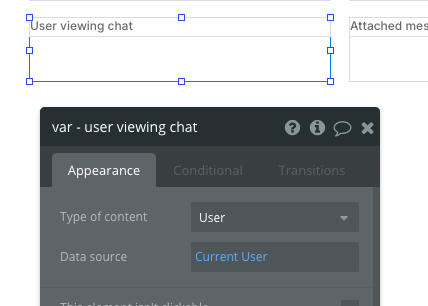
* **var - user viewing chat** - This group stores the `user` information (current user who is viewing the thread and messages).
* **var - attached msg file** - This group temporarily stores a `file` that the current user attaches to a message (this group will be reset when the message is sent).
For more information on how to use hidden variables, click [here](https://docs.airdev.co/canvas/canvas-functionality/data-and-workflows#using-the-hidden-variables-popup).
* Other reusables on this page include:
* [**filters\_template**](https://docs.airdev.co/canvas-pages-and-modules/v/3.0.0/reusables/applyfilters) (hidden by default in the title group)
* [**menufocus\_template**](https://docs.airdev.co/canvas-pages-and-modules/v/3.0.0/reusables/menufocusgroup-or-menu-options)
## How to set up
* In **Popup Hidden Variables**, update **var - user viewing chat's** data source to include any filters for the user who is viewing the chart
* You would want to keep the data source for this group here to `Current user` and remove the conditional statement (Do a search for users:first item is a placeholder for demo purposes).

* Select a message format by showing **Group Collapsible iMsg\_message** or **Group Collapsible Slack\_message**. Hide the format that you are not using.
* \[Optional] Change the iMessage format colors. You can do this by locating the **HTML message styles** in the reusable element and updating the hex color codes. *From-me* styles will apply to all messages sent by you (current user). *From-them* styles will apply to all messages sent by the other user(s).
{% hint style="warning" %}
Make sure you save the original code before you change the hex color codes in **HTML message styles**. Sometimes it takes a few page loads to see the html updates on the page. You can preview the updated html styles by doing a hard refresh in the chrome browser (Command + Shift+ R).
{% endhint %}
#### Adding the bottom chat widget reusable to different pages in your app
{% hint style="info" %}
In Bubble, a reusable element is a way to build elements that you can replicate in more than one page without having to recreate them.
{% endhint %}
* On the page that you have your chat widget instance, set up a workflow to create a new thread and add the user(s) to the thread.
* For example, you might add a Message user button to the page and include the following workflows:\


* The ***topinput\_chat*** instance has a data type of type `t-Thread`. To display all of the current user's threads that he or she is a part of, do not set a thread data source. However, if you want to display only one thread for a user (i.e, hiding the threads list view and only showing the thread conversation view, then you should pass a thread to the reusable instance).